Inspect
See prompt, workflow, privacy, provenance, camera, and color data in plain English.
 AI Metadata Remover
Private file tools that run in your browser
Start with images, or switch to PDF and Word files to clean supported document properties locally. Review the result and download a separate copy.
Choose a fileNo upload. No account. Your original stays unchanged.
Choose your task
Clean a batch, remove geotags, check Content Credentials or keep an AI workflow private.
Automatically clean supported AI and privacy metadata from JPEG and PNG copies.
WebP inspection onlyOpen toolInspect EXIF, XMP, GPS, workflow, ICC and embedded provenance locally.
Read-only until you choose to cleanOpen toolClean supported PNG chunks while checking dimensions, transparency and encoded data.
PNG only · no re-encodingOpen toolApply one rule across multiple images, review each result and download a ZIP with a batch summary.
JPEG & PNG cleaningOpen toolCheck embedded workflow and prompt fields separately before sharing a PNG copy.
PNG workflow fieldsOpen toolReview location fields and create a local copy with supported private EXIF removed.
JPEG & PNGOpen toolInspect embedded provenance and integrity status before deciding what a record means.
Read-only · issuer trust not assessedOpen toolClean supported PDF Info and document-level XMP locally, then recheck the rewritten copy.
PDF · no uploadOpen toolClean supported DOCX core, app and custom properties while retaining document content.
DOCX · no uploadOpen toolDefault cleaning creates a separate JPEG or PNG copy. Use the keep options when capture details or embedded PNG credentials belong in that copy.
One file, one session
Choose your images once. We check, clean and verify them automatically, then show what changed before you download.
See prompt, workflow, privacy, provenance, camera, and color data in plain English.
Supported AI workflow and privacy fields are cleaned automatically, along with embedded PNG Content Credentials.
We scan the new copy again, so you can see what was removed and what stayed.
Save a separate copy after reviewing the verification report. Your original file stays untouched.
What the scan tells you
Remove recognized generation fields such as prompts, node workflows, model settings, seeds, and samplers from supported JPEG and PNG structures. These fields may reveal how an image was made. A software name or C2PA record alone does not prove AI generation. Mixed or unsupported metadata can remain; check the result before sharing.
Open the metadata checkerEditing software or C2PA alone does not prove AI generation.
Choose the right file
Inspection and removal have different limits. This table describes the options currently available in the workspace.
JPEG metadata that mixes workflow details with attribution or camera fields may be preserved. Compressed PNG text that cannot be inspected safely also stays in place. Supported does not mean every field in every file.
Read the PNG cleaner limitationsTry the built-in sample
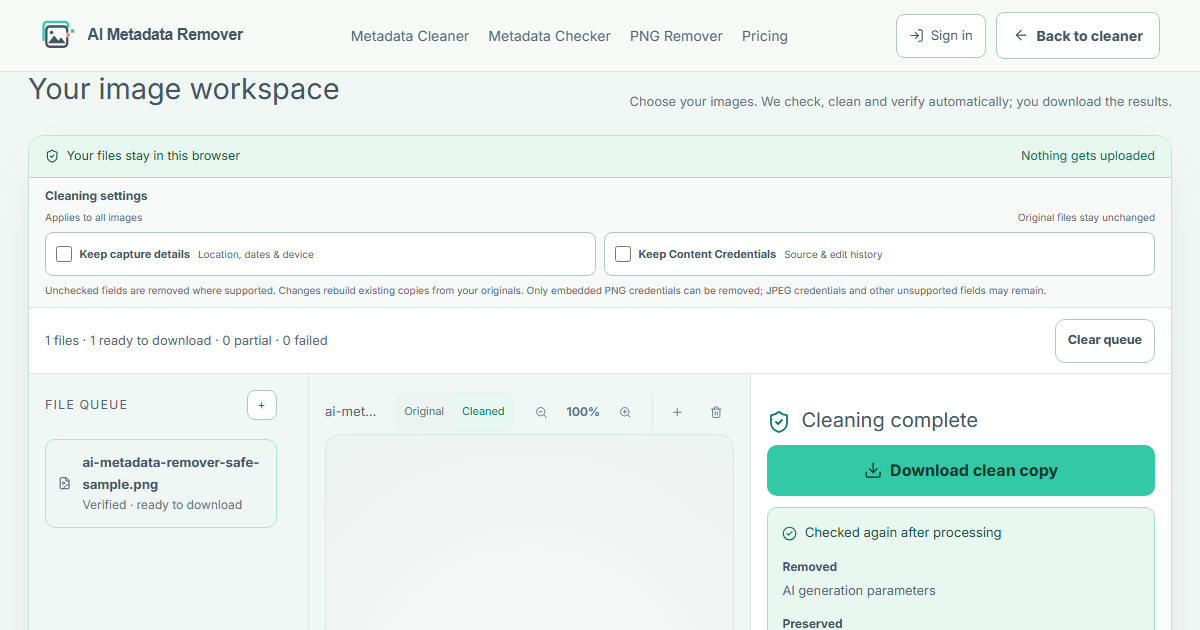
The safe sample is a one-pixel PNG with a parameters field containing steps=30, seed=42, and sampler=euler. It is a test file, not a customer result.
The scanner finds one AI generation parameters field. Choose “Try a safe sample” above to see automatic cleaning and its result.
The supported parameters text chunk is removed. The PNG image data stays unchanged; the tool scans the new copy and checks that it can still be opened.
Results depend on the format and fields present. Supported private EXIF fields are removed by default. Copyright, orientation, and color data stay. Review unresolved findings instead of assuming the whole file is metadata-free.
For a field-by-field explanation, read the workflow metadata article. To check a downloaded copy, use the Image Metadata Checker.
Before you send the file
AI CREATOR
COMMERCE TEAM
PRIVACY CHECK
What the tool can do
We can inspectSupported metadata inside JPEG, PNG, and WebP files.
We can cleanSupported AI workflow and privacy fields in JPEG and PNG, without re-encoding the image data. Default Content Credentials removal applies to PNG caBX records only.
We cannot promiseA particular detector result, platform approval, or pixel-watermark removal. Visual repair is not ready yet.
For background on provenance, see the official C2PA and Content Credentials explainer. Finding an embedded record is different from validating its signature or checking an external provenance history.
Reproduce the result
Choose “Try a safe sample” in the cleaner above. These results describe that synthetic one-pixel PNG with the default settings.
Your files can contain different or unsupported fields. A result marked partial needs review; an unchanged result means no supported data needed cleaning. Reopen the downloaded copy in the Metadata Checker for an additional check.
Read before you publish
Prepare JPEG and PNG client copies locally, review every result, and check a ZIP summary. Understand Pro batch limits, partial copies and filename privacy.
PDF privacyA practical guide to checking PDF author, creator, producer, Info and XMP metadata before sharing a separate cleaned copy.
Word privacyLearn how to inspect and clean supported author, last modified by, company and custom properties in a DOCX before sharing.
Photo editing and AI labelsLearn why edited camera photos can get AI info labels, inspect embedded signals and check what metadata cleaning can change before sharing.
ChatGPT image privacyCheck the actual format of a ChatGPT or DALL·E export, understand PNG and JPEG cleaning limits, and separate Content Credentials from invisible watermarks.
Workflow privacyInspect workflow and prompt fields, clean a static ComfyUI PNG copy without re-encoding, and check what remains. Includes downloadable synthetic test files.
ProvenanceLearn what C2PA Content Credentials record, how to read presence and integrity results, and what removing an embedded image credential changes.
Privacy checklistA plain-language checklist for location, device, capture date and creator metadata before sending an image.
Format guideCompare the metadata structures commonly found in JPEG, PNG and WebP images, including workflow, privacy and provenance fields.
Private image deliveryClean supported JPEG and PNG metadata locally without re-encoding. Follow the steps, compare downloadable test files, and review what remains before sharing.
Quick answers
Automatic cleaning removes supported generation and privacy fields from JPEG and PNG files. WebP is inspection-only. Not every metadata field is supported, so review the verification report before sharing the result.
No. Scanning, cleaning, verification, and downloads happen in your browser. The tool does not upload your image or its filename, and no account is required.
Default cleaning removes supported GPS, capture dates, device identifiers, MakerNotes and JPEG thumbnails. Copyright and orientation stay. Unsupported fields may remain; review the result.
For supported files, cleaning does not decode or re-encode the image data. The tool scans the output again and checks that the browser can read it before offering a download. Keep your original and review the copy.
Embedded PNG caBX Content Credentials are removed by default. Open Cleaning settings to keep them. JPEG and WebP credentials cannot be removed. Removing an embedded record does not erase external provenance records.
No. Metadata is only one signal. Platforms may also use pixels, watermarks, provenance records, or signals this tool cannot access. A cleaned copy does not guarantee a detector result or platform approval.
Read the verification card after cleaning to see what was removed, preserved, or left unresolved. You can also open the downloaded copy in the metadata checker and scan it again. A completed download does not mean every metadata field was removed.
Each file can be up to 25 MB. The desktop workspace accepts up to 30 files and 200 MB per batch; narrower mobile layouts accept up to 10 files and 100 MB. Processing time depends on your device and files.
Keep your original
Use the AI Metadata Cleaner to make a delivery copy, then review the result. We never overwrite the file you started with.